


Stellar Data Recovery for Android – My Experience After Actually Using It
Losing data on an Android phone is one of those things you don’t take seriously until it happens to you. In my case, it was a mix of bad luck and bad decisions. Actually, I was clearing storage in a hurry and later realized important photos and contacts were gone.
I usually ignore “data recovery” software because most apps promise miracles and deliver nothing. But desperate times desperate measures, I needed my data back anyhow. After searching for desktop based android data recovery software (not Play Store apps), I decided to test Stellar Data Recovery for Android and see what it could realistically recover.
I used it across a couple of Android devices over a few weeks, including one phone with display issues. Here’s what the experience was actually like.
Installation and First Use
The software installed quickly on my system and detected my Android device without any extra downloads or bundled tools. I connected the phone via USB, enabled USB debugging, and switched the connection to file transfer mode.
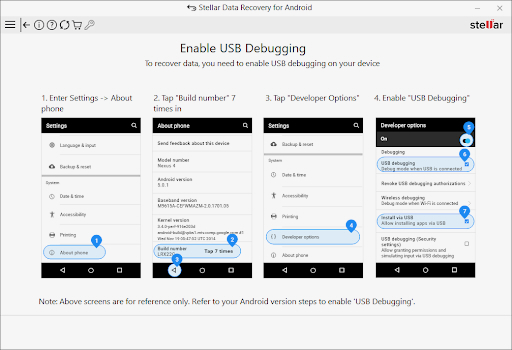
What I appreciated was that the software clearly told me what was missing if something wasn’t set correctly. I didn’t have to guess why the device wasn’t being detected.
The interface is straightforward. Instead of throwing too many options at you, it simply asks what you want to recover — photos, videos, contacts, messages, WhatsApp data, documents, and so on.
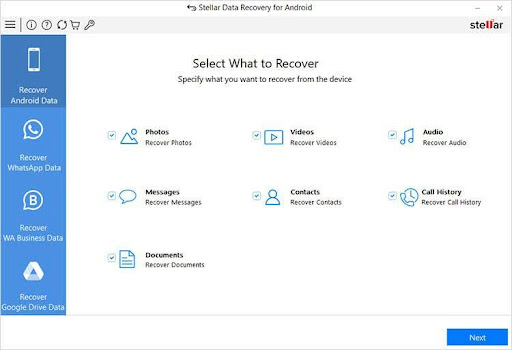
Scanning and Recovery Results
Once the scan started, it took a bit of time depending on the amount of data stored on the phone. On devices with lots of media or apps, it can feel slow, but that’s actually a good thing — a deep scan increases the chances of finding and recovering lost data.
After scanning, the software displayed recoverable items in an organized way, and I could preview files before restoring them.
Here’s what I personally tested during recovery:
- Photos deleted from gallery
- Contacts removed during cleanup
- WhatsApp chats (including media)
- Audio files from a voice recording app
- A phone with a damaged, flickering screen
The results were realistic and useful:
- Contacts and messages were fully recovered
- Photos had the highest success rate (most came back intact)
- Videos depended on whether they were overwritten
- The damaged phone was detected and scanned, which surprised me
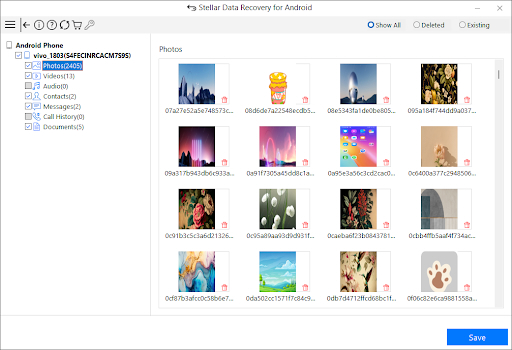
Importantly, the process did not require rooting, which makes it much safer for everyday users.
Things I Liked
- Easy to use even if you’ve never tried recovery software
- Preview feature helps avoid restoring junk
- WhatsApp attachments work even on newer Android versions
- Supports almost all Android versions for other data types
- Lets you recover only what you need instead of everything
Things to Keep in Mind (Limitations)
- WhatsApp chats cannot be recovered on Android 15 and 16, though attachments, media, and stickers can
- Scanning can take time depending on the amount of data stored, but the longer scan is actually a blessing in disguise because it increases recovery chances
- Full recovery requires activation; the trial version only allows scanning and previewing
Pricing
The software starts at just $29.99, which I find reasonable considering the features and results it delivers.
Final Thoughts
After actually using Stellar Data Recovery for Android, I’d describe it as reliable rather than magical ..and that’s a good thing. It doesn’t promise impossible results, but it does recover a meaningful amount of lost data when conditions allow.
If you’ve accidentally deleted files, lost WhatsApp attachments, or are dealing with an Android device that’s acting up after an update, this tool is worth trying. It’s practical, clear in what it can and can’t do, and far more dependable than most recovery apps you’ll find online.
