

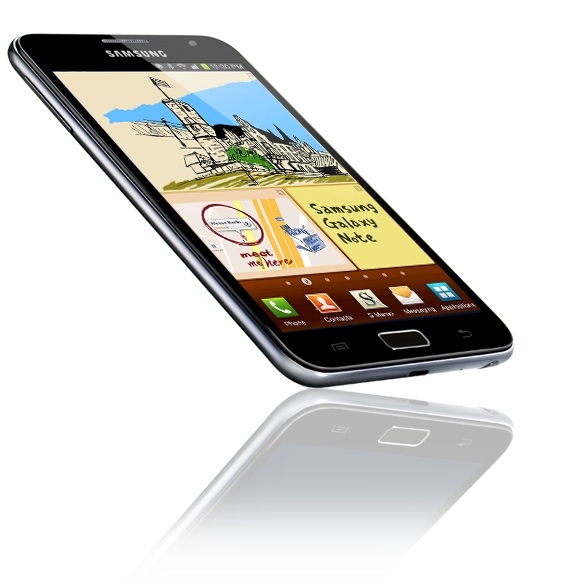


 Once you get over the initial shock of the large 5.3-inch screen on the Galaxy Note you quickly come to appreciate the larger screen size and its capabilities.
Samsung is calling the Galaxy Note an entirely new class of product because, as the name suggests, users can use the included S-Pen to write and draw on the screen.
But the S-Pen is more than just a glorified stylus – it can also act as a mouse and enable a number of gestures.
The company is also planning to bring out a 10.1-inch Galaxy Note which will combine all the features of a tablet and a pad and pen.
The 5.3-inch Samsung Galaxy Note is running Android 2.3 operating system and has all the features you’d expect to find on a smartphone with the tactile addition of writing on the screen with surprising accuracy.
It is an oversized smartphone? Sure.
It is a mini tablet? Right again.
The Samsung Galaxy Note is available now from Optus and Vodafone and, in early April, from Telstra as well.

DESIGN
The Samsung Galaxy Note is like a Samsung Galaxy S II in steroids. It’s basically an overgrown version of the popular Samsung smartphone.
It has the same look of the Galaxy S II right down to the home button and plastic back cover.
The Galaxy Note is big – very big. It still fits nicely in one hand but can be difficult to operate with one hand because of the sheer size of the screen.
What we did to help combat this problem was locate all of our most frequently used apps along the long edges of the screen.
Speaking of screens, the Galaxy Note’s 5.3-inch HD Super AMOLED display is excellent – sharp, clear and bright.

Despite the device’s imposing size, the Galaxy Note is still easy to carry around on our back pocket or in a bag. It is 146.85mm long, 82.95mm wide and 9.65mm thick and weighs in at 178g.
The top edge has a headphone jack with a volume up and down key on the left, an on/off/lock key on the right.
The bottom edge has a microUSB port and the storage bay for the S-Pen.
There is an 8 megapixel rear camera with LED flash and a 2 megapixel front camera. The rear camera is capable of capturing full high definition video.
FEATURES
Apart from all of the features of a smartphone, the Galaxy Note also adds the ability to write directly on the screen.
It can be your doodle pad, note pad, Post-It note, sketch pad and canvas. Users can choose the colour and type of paper and easily change the stroke size, type and colour of the pen and paintbrush.
But the S-Pen can more than just draw. It can also be used for gesture controls. There is a small button on the stem of the S-Pen which, when pressed, can be used for gesture controls by clicking, swiping and tapping the screen.
For example a quick double tap of the S-Pen with the side button on any screen automatically opens a memo window to write a quick note.
A swipe up from the bottom calls up the menu while gesturing left takes users back to the previous screen.

By pressing and holding the S-Pen the screen, again with the button pressed, can capture a screen shot. This is a handy feature to annotate pictures and maps because users can then draw on these screenshots.
Pictures can also be cropped and cut out as well as edited using the S-Pen.
S-Memo is an app which lets you combine several files like pictures, drawings and writing in the same document so it is even easier to communicate
The writing ability is taken a step further thanks to handwriting recognition which means that rather than typing, users can write in any areas where text entry is enabled.
For example, instead of typing out a text message, Galaxy Note owners can write on the screen and watch the text being recognised and converted almost instantly to text.
What we liked about this was that even if the Note didn’t quite translate the writing to text correctly it also put some similar words which can be chosen instead.
There are already a few drawing apps from Samsung’s own app store are have been developed to be optimised on the Galaxy Note.

Already available are drawing apps like Zen Brush and Hello Crayon along with Comic Book which can turn pictures of yourself and your friends into a comic strip.
PERFORMANCE
Using the Galaxy Note is like using a smartphone but on a grander scale. The size of the device does take some getting used to. Holding a device of this size up to your ear to make a call might also look a bit odd.
But every person we showed the Galaxy Note to reacted firstly to the size and then, after a few minutes, saying how much they liked it.

Those extra inches of screen size have so many benefits.
Browsing the web is a whole new experience on the Galaxy Note with pages displaying well and requiring less scrolling.
Having the larger 5.3-inch screen also makes it easier to write accurately and comfortably on the move.
The Samsung Galaxy Note has a dual core 1.4Ghz processor and is very fast on its feet.
The advantage of using a larger device is having a larger battery and the Galaxy Note’s 2500mAh battery does an excellent job at powering the device, and it’s 5.3-inch screen, through a day and half of use.
The camera on the Galaxy Note is also impressive. Users have access to shooting and scene modes, image stabilisation, blink detection, auto focus and GPS tagging.
And the large screen is a fine way to easily frame your pictures and full high definition videos.
For the corporate user, the Galaxy Note can be as much as a workhorse as it is an entertainer.
The Galaxy Note takes the PDA (personal digital assistant) to the 21st century with the calendar, email and secure access to corporate networks and mobile meeting possibilities like conference calls, web conferencing and even shared desktops, applications and documents.
Microsoft Exchange ActiveSync compatibility means the Galaxy Note can be deployed across a corporate network to sync emails, allow remote configuration and access to corporate address books.
Getting your music, videos and pictures on and off the device is easy using Kies Air. Simply connect the Galaxy Note to the same network as your computer, activate Kies, type in the address on the Galaxy Note’s screen into your browser and you have the ability to add and manage your content.
THINGS WE DIDN’T LIKE
Not having 4G on the Australian version of the Galaxy Note was disappointing. Having that added speed would have ticked that extra box that would have made the device even more attractive.
To be fair the Galaxy Note does have HSPA+ which is dual channel 3G access so Telstra customers will see even faster performance on Next G.
Most of the apps we tried with the Galaxy Note scaled well to the larger 5.3-inch screen but there were some that obviously had not been optimised for bigger displays and left a lot of the screen blank.
This is more the fault of Google’s app store rather than Samsung’s, but if you’ve got a large screen you want to use all of it.

VERDICT
The Samsung Galaxy Note is an excellent example of a product which intelligently combines the benefits of a smartphone and a tablet.
The handy features of connectivity, a larger display for browsing, working and viewing content plus the ability to write and draw on the screen form a winning combination.
We always carry around a notepad wherever we go but the Galaxy Tab was a more than capable stand-in but with a lot more added versatility and easy sharing.
And with the Note it is the right “in-between” size so users don’t have to carry both a tablet and a smartphone
The size of the Samsung Galaxy Note is not going to appeal to everyone but for a large and growing number of connected users they are going to quickly discover that bigger is definitely better.
Samsung Galaxy Note
Price: $899 or on a Optus, Vodafone or Telstra plan
Four and a half stars (out of five)
Related Stories
Samsung launches Galaxy Note smartphone/tablet
Samsung Galaxy S II Android 4.0 update available Monday
