Close Menu
  • Guides
    • Televisions
    • Computers
    • Apps
  • Blog
  • Forum
  • News
    • Audio
    • Computers
    • Digital Cameras
    • Gadgets
    • BD/DVD
    • Gaming
    • Televisions
    • Mobiles
    • In-Car News
    • Internet
  • Round Ups
    • Tablets
    • testnews
    • Audio
  • Reviews
    • Mobiles
    • Apps
    • Televisions
    • In-Car
    • Gaming
    • Audio
    • Gadgets
    • Digital Cameras
    • BD/DVD
    • Computers
  • Home
Techguide Marketplace
Internet

How Small Businesses Can Build a Smarter Instagram Strategy

By adminJune 12, 20260

If you run a small business, Instagram is one of the few places where you…

Balancing the Books: Financial Infrastructure for Growing Tech Startups

June 12, 2026

Give Your Old Videos a New Life with Vmake’s AI Video Enhancer

June 12, 2026

AI Is Changing How Brands Work With Influencers

June 12, 2026

Why Australian Tech Professionals Are Going Back to Study AI in 2026

June 12, 2026

2026’s 10 Best ISO 27001 Software for Australia

June 12, 2026
Facebook X (Twitter) Instagram
Facebook X (Twitter) Instagram YouTube
Tech GuideTech Guide
Techguide Marketplace
  • Home
  • Latest News
    1. Appliances
    2. Audio
    3. Cars
    4. Computers
    5. Digital Cameras
    6. Drones
    7. Gadgets
    8. Gaming
    9. In-Car
    10. Internet
    11. Mobiles
    12. Renewable Energy
    13. Smart Home
    14. Televisions
    15. View All

    ECOVACS DEEBOT T90 Pro Omni robot vacuum review – quality solution takes over your cleaning

    March 10, 2026

    Bambu Lab H2C 3D printer review – remarkable device that has created our new obsession

    January 23, 2026

    Ecovacs DEEBOT X11 review – sets a new standard for robot vacuums

    September 30, 2025

    Tineco Floor One S9 Artist review – the effortless way to give your floors a thorough clean

    August 29, 2025

    Sony 1000X THE COLLEXION headphones review – luxurious in design and audio quality

    May 20, 2026

    Samsung Buds4 Pro earphones review – quality that needs to be taken seriously

    April 27, 2026

    Sony WF-1000XM6 earphones review – improvements deliver a superior audio experience

    April 6, 2026

    Amazon Echo Studio and Echo Dot Max smart speaker review – top sound and style

    November 28, 2025

    Amazon unveils new electric delivery vehicles including an electric cargo bike

    June 8, 2026

    Ferrari Luce unveiled as the brand’s stunning first all-electric supercar

    May 26, 2026

    Dreame announces the world’s biggest sports star Cristiano Ronaldo as its global ambassador

    May 26, 2026

    6 Automotive Tech Advancements that are Worth Upgrading your Ride For

    May 20, 2026

    Balancing the Books: Financial Infrastructure for Growing Tech Startups

    June 12, 2026

    Give Your Old Videos a New Life with Vmake’s AI Video Enhancer

    June 12, 2026

    AI Is Changing How Brands Work With Influencers

    June 12, 2026

    Why Australian Tech Professionals Are Going Back to Study AI in 2026

    June 12, 2026

    Arlo Essential Pan Tilt Security Camera review – no more blinds spots for even greater peace of mind

    November 10, 2025

    DJI Mic review – a versatile audio recording system for content creators

    May 9, 2022

    Fujifilm GFX 50s Mk II review – great stills camera to graduate to higher standards

    December 20, 2021

    GoPro HERO10 Black review – even more powerful and even more versatile

    September 20, 2021

    DJI Neo 2 drone review – super light and super simple to fly but it still produces super results

    November 13, 2025

    DJI Neo review – small but capable drone that can produce amazing results and stunning selfies

    September 30, 2024

    DJI Inspire 3 professional filmmaking drone review – it’s called Inspire for a reason

    November 6, 2023

    DJI Air 3 review – excellent dual camera drone with amazing flight time

    August 14, 2023

    ECOVACS DEEBOT T90 Pro Omni robot vacuum review – quality solution takes over your cleaning

    March 10, 2026

    Bambu Lab H2C 3D printer review – remarkable device that has created our new obsession

    January 23, 2026

    Oura Ring 4 review – the discreet way to track your sleep and activities and find ways to improve

    November 25, 2025

    Apple Vision Pro with M5 review – more power to be even more remarkable

    October 30, 2025

    Add a whole dimension to your gaming with the Samsung Odyssey 3D monitor

    July 4, 2025

    We take a hands-on look at Samsung’s stunning new Smart Monitor M9

    June 27, 2025

    PlayStation 5 Portal Remote Player review – it puts your PS5 console in the palm of your hands

    October 3, 2024

    ASUS ROG ALLY X Review: The best Windows gaming handheld

    September 4, 2024

    AAWireless TWO+ car adapter review – go cable free to connect CarPlay and Android Auto

    February 16, 2026

    Uniden DashView 60R review – high quality eyes and ears when you’re driving and parked

    April 1, 2024

    Navman MiVue ALTA DC review – the dashcam that can blend into your car

    October 23, 2023

    We get behind the wheel of the MG ZS electric SUV – driving into the future

    February 9, 2021

    How Small Businesses Can Build a Smarter Instagram Strategy

    June 12, 2026

    Balancing the Books: Financial Infrastructure for Growing Tech Startups

    June 12, 2026

    Give Your Old Videos a New Life with Vmake’s AI Video Enhancer

    June 12, 2026

    AI Is Changing How Brands Work With Influencers

    June 12, 2026

    Balancing the Books: Financial Infrastructure for Growing Tech Startups

    June 12, 2026

    2026’s 10 Best ISO 27001 Software for Australia

    June 12, 2026

    How to Back Up and Recover Data from SD Cards on Mac 

    June 12, 2026

    Insta360 launches Luna Ultra 8K gimbal camera co-engineered with Leica

    June 11, 2026

    Amazon unveils new electric delivery vehicles including an electric cargo bike

    June 8, 2026

    Telstra’s satellite to mobile messaging began a year ago and has now been used by 2.7m customers

    June 4, 2026

    Reasons Smart Homes Are Adding Solar Batteries

    May 20, 2026

    Maximising Roof Space: Solar Systems for Commercial Buildings

    May 20, 2026

    Apple unveils a powerful and more personal Siri AI and next-generation Apple Intelligence

    June 9, 2026

    Is Your Fast Charging Type C Cable Quiet Enough for Home Office?

    June 8, 2026

    Alexa+ fast tracked for Australia before the end of 2026 so it can complete more complicated tasks

    June 4, 2026

    The five mistakes you’re making that are slowing down your NBN speeds

    May 25, 2026

    Sony announces pricing and availability of its stunning new Bravia True RGB TVs

    May 28, 2026

    Dreame announces the world’s biggest sports star Cristiano Ronaldo as its global ambassador

    May 26, 2026

    Samsung reveals the technology that makes its 2026 Micro RGB TVs even better

    May 18, 2026

    Epson launches new short throw projector powered by AI image processing technology

    May 15, 2026

    How Small Businesses Can Build a Smarter Instagram Strategy

    June 12, 2026

    Balancing the Books: Financial Infrastructure for Growing Tech Startups

    June 12, 2026

    Give Your Old Videos a New Life with Vmake’s AI Video Enhancer

    June 12, 2026

    AI Is Changing How Brands Work With Influencers

    June 12, 2026
  • Reviews
    1. Appliances
    2. Apps
    3. Audio
    4. Computers
    5. Digital Cameras
    6. Drones
    7. Gadgets
    8. Gaming
    9. In-Car
    10. Mobiles
    11. Smart Home
    12. Smartwatch
    13. Televisions
    14. View All

    ECOVACS DEEBOT T90 Pro Omni robot vacuum review – quality solution takes over your cleaning

    March 10, 2026

    Bambu Lab H2C 3D printer review – remarkable device that has created our new obsession

    January 23, 2026

    Ecovacs DEEBOT X11 review – sets a new standard for robot vacuums

    September 30, 2025

    Tineco Floor One S9 Artist review – the effortless way to give your floors a thorough clean

    August 29, 2025

    Apple TV 4K review – tiny but mighty unit delivers stunning cinematic quality

    November 3, 2022

    Fetch Mighty (Gen 4) review – a powerful PVR that meets all your content needs

    April 28, 2022

    Backbone One controller review – a real game-changer for iPhone players

    October 6, 2021

    Apple TV 4K 2021 review – access the latest content in the highest quality

    May 31, 2021

    Sony 1000X THE COLLEXION headphones review – luxurious in design and audio quality

    May 20, 2026

    Samsung Buds4 Pro earphones review – quality that needs to be taken seriously

    April 27, 2026

    Sony WF-1000XM6 earphones review – improvements deliver a superior audio experience

    April 6, 2026

    Amazon Echo Studio and Echo Dot Max smart speaker review – top sound and style

    November 28, 2025

    MacBook Air with M5 (2026) review – packs an even bigger punch despite its thin design

    April 10, 2026

    HP OmniBook X Flip 14 laptop review – a versatile and powerful device at an affordable price

    March 31, 2026

    Netgear Nighthawk 5G M7 Portable Wi-Fi 7 Hotspot review – staying connected has never been easier

    March 16, 2026

    MacBook Neo review – Apple’s most affordable laptop punching well above its weight

    March 11, 2026

    Arlo Essential Pan Tilt Security Camera review – no more blinds spots for even greater peace of mind

    November 10, 2025

    DJI Mic review – a versatile audio recording system for content creators

    May 9, 2022

    Fujifilm GFX 50s Mk II review – great stills camera to graduate to higher standards

    December 20, 2021

    GoPro HERO10 Black review – even more powerful and even more versatile

    September 20, 2021

    DJI Neo 2 drone review – super light and super simple to fly but it still produces super results

    November 13, 2025

    DJI Neo review – small but capable drone that can produce amazing results and stunning selfies

    September 30, 2024

    DJI Inspire 3 professional filmmaking drone review – it’s called Inspire for a reason

    November 6, 2023

    DJI Air 3 review – excellent dual camera drone with amazing flight time

    August 14, 2023

    ECOVACS DEEBOT T90 Pro Omni robot vacuum review – quality solution takes over your cleaning

    March 10, 2026

    Bambu Lab H2C 3D printer review – remarkable device that has created our new obsession

    January 23, 2026

    Oura Ring 4 review – the discreet way to track your sleep and activities and find ways to improve

    November 25, 2025

    Apple Vision Pro with M5 review – more power to be even more remarkable

    October 30, 2025

    Add a whole dimension to your gaming with the Samsung Odyssey 3D monitor

    July 4, 2025

    We take a hands-on look at Samsung’s stunning new Smart Monitor M9

    June 27, 2025

    PlayStation 5 Portal Remote Player review – it puts your PS5 console in the palm of your hands

    October 3, 2024

    ASUS ROG ALLY X Review: The best Windows gaming handheld

    September 4, 2024

    AAWireless TWO+ car adapter review – go cable free to connect CarPlay and Android Auto

    February 16, 2026

    Uniden DashView 60R review – high quality eyes and ears when you’re driving and parked

    April 1, 2024

    Navman MiVue ALTA DC review – the dashcam that can blend into your car

    October 23, 2023

    We get behind the wheel of the MG ZS electric SUV – driving into the future

    February 9, 2021

    Honor Magic 8 Pro smartphone review – a worthy flagship option to consider

    May 31, 2026

    Oppo Find N6 foldable smartphone review – raises the bar for foldables along with the price

    May 11, 2026

    Samsung Galaxy A37 smartphone review – features and quality without breaking the bank

    May 5, 2026

    Nothing Phone 4a Pro review – an Android smartphone that’s really something

    April 20, 2026

    ECOVACS DEEBOT T90 Pro Omni robot vacuum review – quality solution takes over your cleaning

    March 10, 2026

    Amazon Echo Studio and Echo Dot Max smart speaker review – top sound and style

    November 28, 2025

    Arlo Essential Pan Tilt Security Camera review – no more blinds spots for even greater peace of mind

    November 10, 2025

    eero Pro 7 review – transform and supercharge your home wireless network

    June 16, 2025

    Apple Watch Series 10 review – bigger screen, thinner, lighter and better

    October 4, 2024

    Samsung Galaxy Watch Ultra review – the bigger watch to help you do bigger things

    July 30, 2024

    Huawei Watch D smartwatch review – take your blood pressure anytime on your wrist

    July 11, 2022

    Withings ScanWatch Horizon review – a traditional watch that has all the smarts

    July 8, 2022

    Hisense UR9 RGB Mini LED TV review – a new level of picture quality and colour fidelity

    May 18, 2026

    Samsung 115-inch Micro RGB TV review – a whole new level of quality, contrast and colour

    March 30, 2026

    Hisense 116-inch RGB Mini LED UX Smart TV review – size does matter and so does the quality

    November 3, 2025

    Samsung 115-inch Neo QLED QN90F 4K Smart TV review – a big screen experience to aspire to

    October 31, 2025

    Honor Magic 8 Pro smartphone review – a worthy flagship option to consider

    May 31, 2026

    Sony 1000X THE COLLEXION headphones review – luxurious in design and audio quality

    May 20, 2026

    Hisense UR9 RGB Mini LED TV review – a new level of picture quality and colour fidelity

    May 18, 2026

    Oppo Find N6 foldable smartphone review – raises the bar for foldables along with the price

    May 11, 2026
  • Blog

    What is a university degree worth if you cheated with AI to get it?

    February 9, 2026

    From Keywords to Conversations: How LLMs Are Reshaping Search for Tech Startups

    July 24, 2025

    Would you believe the massive global IT outage could have been far worse

    July 22, 2024

    Hey Tesla the affair is over – I’ve now gone back to my ex

    August 4, 2023

    Why we should all do our part and download the coronavirus contact tracking app

    April 20, 2020
  • Apple

    How to Back Up and Recover Data from SD Cards on Mac 

    June 12, 2026

    The 10 new features that didn’t make Apple’s Worldwide Developers Conference keynote

    June 10, 2026

    Navigating macOS Security: Why Your Mac Blocks Certain Files and How to Safely Open Them

    June 9, 2026

    Apple’s latest operating systems offer speed improvements, new features and greater parental controls

    June 9, 2026

    Apple unveils a powerful and more personal Siri AI and next-generation Apple Intelligence

    June 9, 2026
  • Samsung

    Samsung unveils its Sky Portal Studio activation for Vivid Sydney

    May 22, 2026

    Samsung reveals the technology that makes its 2026 Micro RGB TVs even better

    May 18, 2026

    Samsung Buds4 Pro earphones review – quality that needs to be taken seriously

    April 27, 2026

    Samsung reveals pricing and availability of its AI-powered 2026 TV range including Micro RGB

    April 22, 2026

    Samsung 115-inch Micro RGB TV review – a whole new level of quality, contrast and colour

    March 30, 2026
  • Techguide Marketplace
Tech GuideTech Guide
Home»Apple»Apple accessibility features that make its products usable and customisable for anyone
Apple

Apple accessibility features that make its products usable and customisable for anyone

Stephen FenechBy Stephen FenechApril 25, 2022Updated:April 25, 2022No Comments8 Mins Read
Share
Facebook Twitter LinkedIn Pinterest Email

Apple is leading the way with accessibility features on its products including iPhone and iPad, that are designed to make the devices still usable for people with vision, hearing, mobility and cognitive disabilities.

One in five Australians have a disability – that’s more than 4.4 million people.

And Australians are also aging into disability with 16 per cent of the population aged over 65.

According to the Australian Institute of Health and Welfare, at age 65, Australians can expect to live, on average, over half of their remaining years with some level of disability.

With that in mind, it’s a good time to highlight some of many accessibility features Apple has created to give anybody with a disability to enjoy the features of their iPhone and iPad in their day to day usage and be equally empowered by the product as any able-bodied customer.

Many of the accessibility features can be used by anyone with many providing a handy shortcut or a convenient new way to use the product.

And some we never knew existed.

The four main areas are vision, hearing, cognitive, and mobility.

VISION

Globally there are 285 million people who are visually impaired – of these 39 million are blind.

There are several accessibility features including:

– VoiceOver:  VoiceOver is a screen reader that tells you exactly what’s happening on your device. In iOS 15, VoiceOver can now describe people, objects, text and graphs in greater detail than ever. Auditory descriptions of elements help you easily navigate your screen through a Bluetooth keyboard or simple gestures on a touchscreen or trackpad. Set up instructions here.

– Speak Screen:  With Speak Screen, you can hear the content of your entire screen read aloud to you, while Speak Selection lets you select and hear a specific range of text. You can also control the pace of the reading more precisely during speech playback with Speech Controller. And all this spoken content can come from one of 70 voices in over 35 languages with customisable pronunciations, so your spoken content won’t feel impersonal at all. Set up instructions here.

– Text Size:  Increase text legibility and visibility with simple font adjustments. Larger Text allows you to adjust the size using an accessibility slider. Or you can turn on Bold Text to give words weight on your screen. Your preferred settings can be applied to only the apps you choose. Set up instructions here.

– Magnifier:  Magnifier works like a digital magnifying glass. It uses the camera on your iPhone, iPad or iPod touch to increase the size of any physical object you point it at, like a menu or sign, so you can see all the details clearly on your screen. Set up instructions here.

– People Detection:  The LiDAR Scanner in iPhone 12 Pro, iPhone 12 Pro Max, iPhone 13 Pro and iPhone 13 Pro Max, 12.9‑inch iPad Pro (4th generation or later), and 11‑inch iPad Pro (2nd generation or later) can determine a person’s proximity to you. People Detection uses technology that measures how long it takes light to reflect back from objects, helping you do things like stand in line at a safe distance, better navigate a noisy area or find an empty seat with ease. Set up instructions here.

HEARING

In 2005 there was an estimated 3.55 million Australians that had some level of hearing loss – that’s the equivalent of about 17 per cent of the population.

Hearing aids are now available that work with the iPhone.

Apple has partnered with top manufacturers to create hearing aids and sound processors designed specifically for iPhone, iPad and iPod touch.

These advanced hearing devices provide outstanding sound quality, offer many helpful features, and are as easy to set up and use as any other Bluetooth device.

Users can also Instantly apply their audiologist’s environmental presets as you go outdoors or enter noisy locations, like restaurants, without having to rely on additional remotes. Set up instructions here.

Other hearing accessibility features include:

– Live Listen:  Live Listen is an assistive listening feature that helps you have better conversations in loud places. Once activated you can move your device towards the people you’re talking with. Audio is picked up by the device microphone and sent to your wireless headphones or hearing aid, so you can hear what they’re saying more clearly. Set up instructions here.

– Conversation Boost:  Conversation Boost for AirPods Pro helps you better hear conversations in crowded or noisy environments. Through computational audio and beamforming microphones, Conversation Boost focuses AirPods Pro on the voice of the person directly in front of you, making it easier to distinguish speech and follow along in face‑to‑face conversations. Set up instructions here.

– Sound Recognition:  Sound Recognition can listens for certain sounds and uses on‑device intelligence to notify you when a specific sound is detected. You’ll receive a notification when a particular sound like a doorbell or crying baby is detected. Set up instructions here.

In the Shortcuts app, it’s possible to set up personal automations when sound recognition is triggered.

For example, a smart light can turn red when the doorbell is heard.

COGNITIVE
– Background Sounds:  Everyday sounds can be uncomfortable or annoying. Background sounds like distant rain or ocean waves can minimise distractions and help you focus, stay calm or rest. Choose from balanced, bright or dark noise — or ocean, rain or stream sounds — to mask excess environmental or external noise. These sounds can also mix into or duck under other audio and system sounds that are playing through your device. Set up instructions here.

– Safari Reader:  Sometimes navigating the web can be a sensory overload. Safari Reader is an assistive technology feature that strips away ads, buttons and navigation bars, allowing you to focus on all the content you want — and none of the clutter. Set up instructions here.

– Guided Access:  Guided Access helps you stay focused on the task (or app) at hand. You can limit a device to stay on one app at a time by disabling the Home button.

You can even restrict access to the keyboard or touch input on certain areas of the screen so wandering taps and gestures won’t distract from learning.

Whether you’re a parent, a teacher or just trying to help yourself focus, you have all the options you need to customise your experience on Apple products. Set up instructions here.

MOBILITY

People with physical and mobility disabilities can’t touch, type or hold their device but there are features that allow users to take control with their voice or with eye tracking.

– Dictation:  Dictation lets you talk wherever you would type. With this feature you can type an email, notes or a web address — without typing at all and by just using your voice. Tap the microphone button on the onscreen keyboard, say what you want to write, and your device converts your words (and numbers and characters) into text. Set up instructions here.

– Voice Control:  You can navigate your device using just your voice. Commands like click, swipe and tap help you easily interact with your favourite apps. You can precisely select, drag and zoom by showing numbers alongside clickable items, or by superimposing a grid on the screen. Voice Control also offers a more efficient way to write and edit. It’s a seamless process to make corrections, format changes, and transition between text dictation and commands. Set up instructions here.

– Switch Control:  Switch Control makes it easy and efficient to control your device with a variety of adaptive switch hardware, wireless game controllers or even simple sounds. If you have extensive motor limitations, you can use item, point and manual scanning to navigate sequentially through onscreen keyboards, menus and the Dock.

You can create your own customised panels and keyboards, system-wide or app by app. Platform Switching allows you to use a single device to navigate any other devices you have synced with your iCloud account. That way, you can control your Mac directly from your iPhone or iPad without having to set up your switches on each new device. Set up instructions for Mac here. Also available on iOS devices.

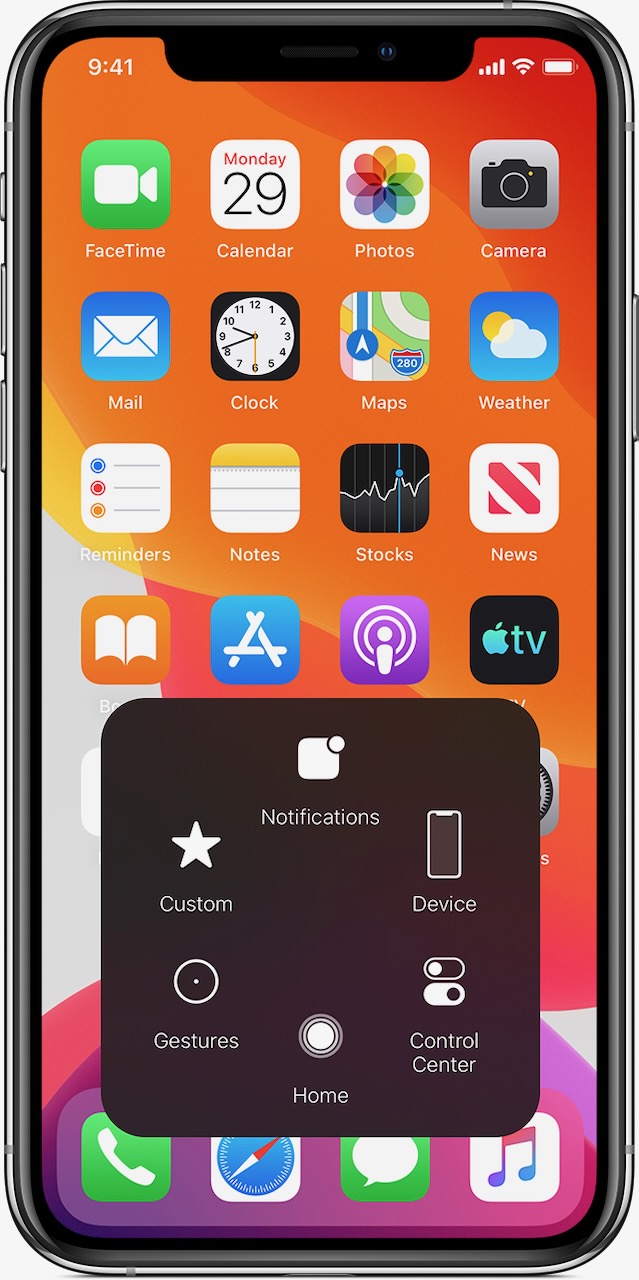
– AssistiveTouch:  This feature for iOS and iPadOS lets you adapt your touchscreen to fit your physical needs. If certain gestures, like pinch or tap, don’t work for you, swap them with a gesture that does or create a touch that’s all your own. You can customise the layout of the AssistiveTouch menu too, or connect a Bluetooth mouse to control an onscreen pointer for navigation. Set up instructions here.
– AssistiveTouch for Apple Watch now enables users with upper-body limb differences to navigate an onscreen motion pointer on their Apple Watch display or answer calls using clench, double-clench and pinch gestures. Set up instructions here.

– Head Tracking:  Uses the camera on your device to follow the movement of your head to control a pointer on your screen, and tracks your facial movements to perform actions. On Mac, Pointer Control already allows you to use different methods, like head movements, to control your cursor and mouse button. Set up instructions here.

– Eye Tracking:  iPadOS now supports third-party eye-tracking devices, making it possible for people to control iPad using just their eyes. Compatible devices will track where a person is looking on screen and the pointer will move to follow the person’s gaze, while extended eye contact will perform an action, like a tap. Set up instructions here.

– Back Tap:  Meet the easiest shortcut ever. Back Tap lets you double‑tap or triple‑tap the back of your iPhone to automatically perform a range of customised tasks — from opening your favourite app to taking a screenshot. Choose from 24 different actions or create your own automated shortcuts to simplify your everyday tasks, including: mute, open camera, or screen shot. Set up instructions here.

Featured
Share. Facebook Twitter Pinterest LinkedIn Tumblr Email
Stephen Fenech
  • Website

Stephen is the Tech Guide editor and one of Australia's most respected tech journalists. He is a regular on radio and TV talking about the latest tech news, products and trends.

Related Posts

Balancing the Books: Financial Infrastructure for Growing Tech Startups

June 12, 2026

Give Your Old Videos a New Life with Vmake’s AI Video Enhancer

June 12, 2026

AI Is Changing How Brands Work With Influencers

June 12, 2026

Comments are closed.

100% Human
Tech Guide only publishes quality 100% Human content you can trust. AI has never and will never be used to generate any articles and reviews despite the rise of AI and the flood of AI-generated writing elsewhere. We also reject the use of our content to be used by AI in any form whatsoever.

Get the latest news from the Tech Guide straight to your inbox.

  • Home
  • Latest News
    • Appliances
    • Audio
    • Cars
    • Computers
    • Digital Cameras
    • Drones
    • Gadgets
    • Gaming
    • In-Car
    • Internet
    • Mobiles
    • Renewable Energy
    • Smart Home
    • Televisions
  • Reviews
    • Appliances
    • Apps
    • Audio
    • Computers
    • Digital Cameras
    • Drones
    • Gadgets
    • Gaming
    • In-Car
    • Mobiles
    • Smart Home
    • Smartwatch
    • Televisions
  • Blog
  • Apple
  • Samsung
  • Techguide Marketplace
  • Home
  • Latest News
    • Appliances
    • Audio
    • Cars
    • Computers
    • Digital Cameras
    • Drones
    • Gadgets
    • Gaming
    • In-Car
    • Internet
    • Mobiles
    • Renewable Energy
    • Smart Home
    • Televisions
  • Reviews
    • Appliances
    • Apps
    • Audio
    • Computers
    • Digital Cameras
    • Drones
    • Gadgets
    • Gaming
    • In-Car
    • Mobiles
    • Smart Home
    • Smartwatch
    • Televisions
  • Blog
  • Apple
  • Samsung
  • Techguide Marketplace

Honor Magic 8 Pro smartphone review – a worthy flagship option to consider

Sony 1000X THE COLLEXION headphones review – luxurious in design and audio quality

Hisense UR9 RGB Mini LED TV review – a new level of picture quality and colour fidelity

Oppo Find N6 foldable smartphone review – raises the bar for foldables along with the price

Samsung Galaxy A37 smartphone review – features and quality without breaking the bank

Samsung Buds4 Pro earphones review – quality that needs to be taken seriously

The Best Movies You’ve Never Seen – Wayne’s World

Two Blokes Talking Tech Episode 736 unpacks Apple’s Worldwide Developers Conference

Turn your attention to Episode 697 of the top-rating Tech Guide podcast

© 2025 Techguide. Designed by Multimediax.

Type above and press Enter to search. Press Esc to cancel.