
Close Menu
  • Guides
    • Televisions
    • Computers
    • Apps
  • Blog
  • Forum
  • News
    • Audio
    • Computers
    • Digital Cameras
    • Gadgets
    • BD/DVD
    • Gaming
    • Televisions
    • Mobiles
    • In-Car News
    • Internet
  • Round Ups
    • Tablets
    • testnews
    • Audio
  • Reviews
    • Mobiles
    • Apps
    • Televisions
    • In-Car
    • Gaming
    • Audio
    • Gadgets
    • Digital Cameras
    • BD/DVD
    • Computers
  • Home
Computers

Running Out of Storage? How Advanced SystemCare Clears Junk and Large Files  

By Stephen FenechNovember 19, 20260

Running out of storage space right when you need to install a Windows update or…

ECOVACS kicks off Black Friday and Cyber Monday sales with up to 78 per cent off its robot vacuums

November 19, 2026

Grand Theft Auto VI launches to rave reviews and will be the biggest entertainment release ever

November 19, 2026

Meta launches Muse in Australia – a personal AI agent built for everyone

November 18, 2026

Make the right move and take a listen to Episode 720 of the top-rating Tech Guide podcast

November 17, 2026

Apple to add Face Unlock to iPhone Duo in future software update

November 17, 2026
Facebook X (Twitter) Instagram
Facebook X (Twitter) Instagram YouTube
Tech GuideTech Guide
  • Home
  • Latest News
    1. Appliances
    2. Audio
    3. Cars
    4. Computers
    5. Digital Cameras
    6. Drones
    7. Gadgets
    8. Gaming
    9. In-Car
    10. Internet
    11. Mobiles
    12. Renewable Energy
    13. Smart Home
    14. Televisions
    15. View All

    Tineco Floor One S9 Artist Steam Plus review – effortless and effective chemical-free cleaning

    November 9, 2026

    ECOVACS DEEBOT X12S OmniCyclone robot vacuum mop review – sets a new cleaning standard

    9.5 October 19, 2026

    Mammotion LUBA 3 AWD robot mower review – can handle large yards of all shapes and sizes

    August 17, 2026

    Tineco Pure One P50 Pro review – a premium and flexible cleaning powerhouse

    June 30, 2026

    Apple AirPods 5 review – punching above their weight for audio quality, ANC and value

    October 12, 2026

    Sennheiser HD 480 Pro Plus professional monitoring headphones review – comfort and high quality

    October 5, 2026

    Noble Audio FoKus Apollo Pro wireless headphones review – luxury design and audio quality

    August 25, 2026

    JBL 780NC and 680NC headphones review – high quality audio, bold colours, comfort and value

    June 23, 2026

    Buying an EV through your ABN? Here is what the lender actually checks 

    November 10, 2026

    Beating the 3pm Driving Slump with Smart Habits and Less Distraction

    October 25, 2026

    Tesla shows off its new Roadster. And it can fly

    October 16, 2026

    The Hidden Technology Built Into Today’s Car Windscreens

    September 12, 2026

    Running Out of Storage? How Advanced SystemCare Clears Junk and Large Files  

    November 19, 2026

    Has Your Business Outgrown Xero or MYOB?

    November 16, 2026

    The Essential Eight Explained for Small and Medium Australian Businesses

    November 16, 2026

    Why companies still send contracts as email attachments

    November 16, 2026

    GoPro Mission I Pro review – the action camera has turned into a cinema camera

    August 3, 2026

    Arlo Essential Pan Tilt Security Camera review – no more blinds spots for even greater peace of mind

    November 10, 2025

    DJI Mic review – a versatile audio recording system for content creators

    May 9, 2022

    Fujifilm GFX 50s Mk II review – great stills camera to graduate to higher standards

    December 20, 2021

    DJI Neo 2 drone review – super light and super simple to fly but it still produces super results

    November 13, 2025

    DJI Neo review – small but capable drone that can produce amazing results and stunning selfies

    September 30, 2024

    DJI Inspire 3 professional filmmaking drone review – it’s called Inspire for a reason

    November 6, 2023

    DJI Air 3 review – excellent dual camera drone with amazing flight time

    August 14, 2023

    Apple HomeView review – stylish new way to stay connected, entertained, informed and in control

    November 13, 2026

    Hisense XR10 review – a 4K triple laser projector for all seasons and all viewers

    November 2, 2026

    ECOVACS DEEBOT X12S OmniCyclone robot vacuum mop review – sets a new cleaning standard

    9.5 October 19, 2026

    Mammotion LUBA 3 AWD robot mower review – can handle large yards of all shapes and sizes

    August 17, 2026

    Add a whole dimension to your gaming with the Samsung Odyssey 3D monitor

    July 4, 2025

    We take a hands-on look at Samsung’s stunning new Smart Monitor M9

    June 27, 2025

    PlayStation 5 Portal Remote Player review – it puts your PS5 console in the palm of your hands

    October 3, 2024

    ASUS ROG ALLY X Review: The best Windows gaming handheld

    September 4, 2024

    AAWireless TWO+ car adapter review – go cable free to connect CarPlay and Android Auto

    February 16, 2026

    Uniden DashView 60R review – high quality eyes and ears when you’re driving and parked

    April 1, 2024

    Navman MiVue ALTA DC review – the dashcam that can blend into your car

    October 23, 2023

    We get behind the wheel of the MG ZS electric SUV – driving into the future

    February 9, 2021

    Running Out of Storage? How Advanced SystemCare Clears Junk and Large Files  

    November 19, 2026

    Your Smart TV Knows More About Your Viewing Habits Than You Do: Here’s Why

    November 16, 2026

    Has Your Business Outgrown Xero or MYOB?

    November 16, 2026

    Why companies still send contracts as email attachments

    November 16, 2026

    Apple to add Face Unlock to iPhone Duo in future software update

    November 17, 2026

    The Essential Eight Explained for Small and Medium Australian Businesses

    November 16, 2026

    The banking app is becoming part of the checkout experience

    November 14, 2026

    Offshore VPS Explained: When Australians Should Host Outside the Country

    November 14, 2026

    Home Battery vs Generator vs Grid: What Keeps Your Home Running in a Blackout?

    October 31, 2026

    Opening a US Office From Australia: Phones, Power, Internet and Support in a New City

    October 30, 2026

    Why Dynamic Project Sites Prefer Portable Buildings

    October 25, 2026

    Why Reliable Backup and Off-Grid Power Matters on Farms

    October 3, 2026

    AI Virtual Receptionist and Business Automation

    November 14, 2026

    Streaming Devices for Older Adults: Setup, Navigation, and Voice Control

    November 14, 2026

    Ring launches new Drone Cam – a security camera that can fly around your home

    November 12, 2026

    Home Battery vs Generator vs Grid: What Keeps Your Home Running in a Blackout?

    October 31, 2026

    Your Smart TV Knows More About Your Viewing Habits Than You Do: Here’s Why

    November 16, 2026

    What to Look for in Home Theater Furniture That Lasts

    October 25, 2026

    The new Apple TV 4K powered by Siri AI is your smart gateway to entertainment and gaming

    October 14, 2026

    Epson’s new LifeStudio Series 4K smart projectors are designed to be used anywhere in your home

    September 17, 2026

    Running Out of Storage? How Advanced SystemCare Clears Junk and Large Files  

    November 19, 2026

    ECOVACS kicks off Black Friday and Cyber Monday sales with up to 78 per cent off its robot vacuums

    November 19, 2026

    Meta launches Muse in Australia – a personal AI agent built for everyone

    November 18, 2026

    Make the right move and take a listen to Episode 720 of the top-rating Tech Guide podcast

    November 17, 2026
  • Reviews
    1. Appliances
    2. Apps
    3. Audio
    4. Computers
    5. Digital Cameras
    6. Drones
    7. Gadgets
    8. Gaming
    9. In-Car
    10. Mobiles
    11. Smart Home
    12. Smartwatch
    13. Televisions
    14. View All

    Tineco Floor One S9 Artist Steam Plus review – effortless and effective chemical-free cleaning

    November 9, 2026

    ECOVACS DEEBOT X12S OmniCyclone robot vacuum mop review – sets a new cleaning standard

    9.5 October 19, 2026

    Mammotion LUBA 3 AWD robot mower review – can handle large yards of all shapes and sizes

    August 17, 2026

    Tineco Pure One P50 Pro review – a premium and flexible cleaning powerhouse

    June 30, 2026

    Plaud Note Pro and Plaud NotePin S review – bring the power of AI with you everywhere

    June 17, 2026

    Apple TV 4K review – tiny but mighty unit delivers stunning cinematic quality

    November 3, 2022

    Fetch Mighty (Gen 4) review – a powerful PVR that meets all your content needs

    April 28, 2022

    Backbone One controller review – a real game-changer for iPhone players

    October 6, 2021

    Apple AirPods 5 review – punching above their weight for audio quality, ANC and value

    October 12, 2026

    Sennheiser HD 480 Pro Plus professional monitoring headphones review – comfort and high quality

    October 5, 2026

    Noble Audio FoKus Apollo Pro wireless headphones review – luxury design and audio quality

    August 25, 2026

    JBL 780NC and 680NC headphones review – high quality audio, bold colours, comfort and value

    June 23, 2026

    MacBook Pro with M6 review – brilliant combination of speed, performance and battery efficiency

    November 6, 2026

    Mac mini with M6 review – power and performance to handle complex AI tasks but a tiny footprint

    September 28, 2026

    HP OmniBook Ultra 14 review – the allrounder laptop for work, play and entertainment

    September 14, 2026

    ASUS Zenbook A16 laptop review – an impressive allrounder for work and play

    August 20, 2026

    GoPro Mission I Pro review – the action camera has turned into a cinema camera

    August 3, 2026

    Arlo Essential Pan Tilt Security Camera review – no more blinds spots for even greater peace of mind

    November 10, 2025

    DJI Mic review – a versatile audio recording system for content creators

    May 9, 2022

    Fujifilm GFX 50s Mk II review – great stills camera to graduate to higher standards

    December 20, 2021

    DJI Neo 2 drone review – super light and super simple to fly but it still produces super results

    November 13, 2025

    DJI Neo review – small but capable drone that can produce amazing results and stunning selfies

    September 30, 2024

    DJI Inspire 3 professional filmmaking drone review – it’s called Inspire for a reason

    November 6, 2023

    DJI Air 3 review – excellent dual camera drone with amazing flight time

    August 14, 2023

    Apple HomeView review – stylish new way to stay connected, entertained, informed and in control

    November 13, 2026

    Hisense XR10 review – a 4K triple laser projector for all seasons and all viewers

    November 2, 2026

    ECOVACS DEEBOT X12S OmniCyclone robot vacuum mop review – sets a new cleaning standard

    9.5 October 19, 2026

    Mammotion LUBA 3 AWD robot mower review – can handle large yards of all shapes and sizes

    August 17, 2026

    Add a whole dimension to your gaming with the Samsung Odyssey 3D monitor

    July 4, 2025

    We take a hands-on look at Samsung’s stunning new Smart Monitor M9

    June 27, 2025

    PlayStation 5 Portal Remote Player review – it puts your PS5 console in the palm of your hands

    October 3, 2024

    ASUS ROG ALLY X Review: The best Windows gaming handheld

    September 4, 2024

    AAWireless TWO+ car adapter review – go cable free to connect CarPlay and Android Auto

    February 16, 2026

    Uniden DashView 60R review – high quality eyes and ears when you’re driving and parked

    April 1, 2024

    Navman MiVue ALTA DC review – the dashcam that can blend into your car

    October 23, 2023

    We get behind the wheel of the MG ZS electric SUV – driving into the future

    February 9, 2021

    Apple HomeView review – stylish new way to stay connected, entertained, informed and in control

    November 13, 2026

    iPhone Duo review – an irresistible combination of hardware and software

    October 26, 2026

    iPhone 18 Pro and iPhone 18 Pro Max review – a bigger upgrade than it appears

    September 20, 2026

    Samsung Galaxy Z Fold8 Ultra review – sets the bar for flagship foldable smartphones

    August 31, 2026

    Apple TV 4K (4th Gen) review – adds intelligence and convenience to a high quality viewing experience

    November 16, 2026

    Apple HomeView review – stylish new way to stay connected, entertained, informed and in control

    November 13, 2026

    Mammotion LUBA 3 AWD robot mower review – can handle large yards of all shapes and sizes

    August 17, 2026

    eero Outdoor 7 review – the answer to your backyard wi-fi woes

    July 6, 2026

    Apple Watch Series 10 review – bigger screen, thinner, lighter and better

    October 4, 2024

    Samsung Galaxy Watch Ultra review – the bigger watch to help you do bigger things

    July 30, 2024

    Huawei Watch D smartwatch review – take your blood pressure anytime on your wrist

    July 11, 2022

    Withings ScanWatch Horizon review – a traditional watch that has all the smarts

    July 8, 2022

    Apple TV 4K (4th Gen) review – adds intelligence and convenience to a high quality viewing experience

    November 16, 2026

    Hisense XR10 review – a 4K triple laser projector for all seasons and all viewers

    November 2, 2026

    Sony True RGB Bravia 7 II TV review – stunning quality and colour accuracy

    August 18, 2026

    Hisense UR9 RGB Mini LED TV review – a new level of picture quality and colour fidelity

    May 18, 2026

    Apple TV 4K (4th Gen) review – adds intelligence and convenience to a high quality viewing experience

    November 16, 2026

    Apple HomeView review – stylish new way to stay connected, entertained, informed and in control

    November 13, 2026

    Tineco Floor One S9 Artist Steam Plus review – effortless and effective chemical-free cleaning

    November 9, 2026

    MacBook Pro with M6 review – brilliant combination of speed, performance and battery efficiency

    November 6, 2026
  • Blog

    What is a university degree worth if you cheated with AI to get it?

    February 9, 2026

    From Keywords to Conversations: How LLMs Are Reshaping Search for Tech Startups

    July 24, 2025

    Would you believe the massive global IT outage could have been far worse

    July 22, 2024

    Hey Tesla the affair is over – I’ve now gone back to my ex

    August 4, 2023

    Why we should all do our part and download the coronavirus contact tracking app

    April 20, 2020
  • Apple

    Apple to add Face Unlock to iPhone Duo in future software update

    November 17, 2026

    Apple TV 4K (4th Gen) review – adds intelligence and convenience to a high quality viewing experience

    November 16, 2026

    Apple HomeView review – stylish new way to stay connected, entertained, informed and in control

    November 13, 2026

    There are now more than 100,000 apps built for iPhone Duo

    November 10, 2026

    MacBook Pro with M6 review – brilliant combination of speed, performance and battery efficiency

    November 6, 2026
  • Samsung

    Calls and texts no longer the main priority for young Australian smartphone users

    October 23, 2026

    Global smartphone shipments slump 20 per cent but Samsung still holds on to the top spot

    October 16, 2026

    Samsung Galaxy Z Fold8 Ultra review – sets the bar for flagship foldable smartphones

    August 31, 2026

    Samsung’s new Galaxy S26 FE offers a flagship experience at an affordable price

    August 28, 2026

    Samsung Galaxy Watch Ultra 2 smartwatch review – thinner, brighter and longer battery life

    July 27, 2026
Tech GuideTech Guide
Home»Latest News»Computers»Running Out of Storage? How Advanced SystemCare Clears Junk and Large Files  
Photo by Windows on Unsplash
Computers

Running Out of Storage? How Advanced SystemCare Clears Junk and Large Files  

Stephen FenechBy Stephen FenechNovember 19, 2026No Comments5 Mins Read
Share
Facebook Twitter LinkedIn Pinterest Email

Running out of storage space right when you need to install a Windows update or a new program is a common frustration.

Over time, temporary files, browser caches, and leftover data from uninstalled apps quietly pile up, eating away at gigabytes of your hard drive. Instead of digging through system folders to delete these files one by one, you can use Advanced SystemCare to detect and wipe out the clutter automatically. Below, we’ll walk through how to use its cleanup tools to recover disk space with minimal effort.

Part 1: What is Advanced SystemCare

As the newest release in IObit’s Windows optimization lineup, Advanced SystemCare brings deep cleaning, intelligent scanning, and live system monitoring together under one roof. Instead of forcing you to juggle separate utilities, it centralizes essential maintenance—letting you clear out digital clutter, troubleshoot system errors, and tame resource-heavy startup apps from a single dashboard. The software also goes past simple file deletion to handle day-to-day upkeep, sweeping away browser tracking data, broken shortcuts, registry bloat, and sluggish background tasks. Ultimately, whether your goal is reclaiming storage space or keeping an aging machine responsive, it consolidates the core tools you need into one straightforward package.

Part 2: Advanced SystemCare Features That Help Reclaim Gigabytes of Storage
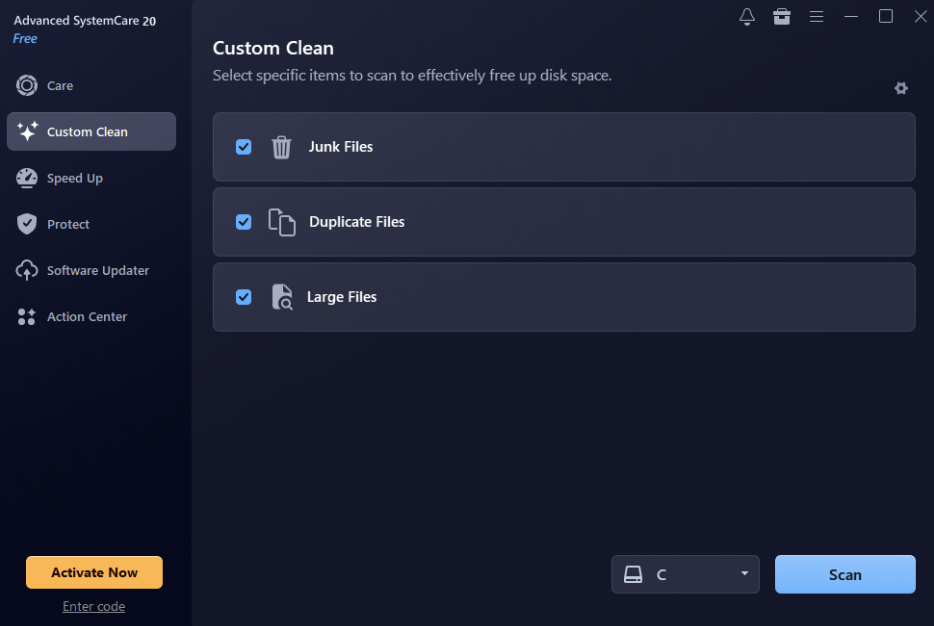
The program includes a wide range of cleaning and optimization features that help users identify unnecessary files, remove digital clutter, and recover valuable disk space. Here are some key features of Advanced SystemCare: 

  • Deep Clean: Junk files, caches, duplicate content, and other unnecessary data can fill up disk space easily. Advanced SystemCare’s Deep Clean feature helps users identify and remove unwanted files with a single click. This makes it easier to maintain sufficient free space for important applications and personal files. 
  • Large File Cleanup: Large files can easily take up gigabytes of storage, especially when users have old videos, downloaded files, installation packages, and more. Advanced SystemCare’s Large File Cleanup features help users identify files that occupy significant disk space, making it easier to locate unnecessary data. 
  • Real-Time Hardware Monitoring: One of the standout features of Advanced SystemCare is that it offers real-time hardware monitoring, allowing users to keep an eye on important system resources and hardware performance. It helps monitor key components such as CPU, RAM, disk activity, temperature, and more. 
  • 20+ Practical Tools: Advanced SystemCare is packed with amazing tools, each with unique features and capabilities. It offers tools such as Internet Booster, DNS Protector, Large File Cleaner, Privacy Sweep, Startup Optimization, Shortcut Fixer, Software Updater, and more. 
  • Intuitive Interface: IObit Advanced SystemCare offers an easy-to-use interface, which is ideal for non-tech and beginner users. With this tool, anyone can reclaim valuable storage space, clean unnecessary files, and optimize their computer without requiring advanced technical knowledge. 

Part 3: Benefits of Reclaiming Gigabytes of Storage Space 

Freeing up gigabytes of storage space offers several advantages. Below, we have mentioned the top benefits: 

  • Free storage space enables users to download new applications and updates without facing any difficulties. 
  • It provides more room to store important documents, photos, videos, and other personal files. 
  • Regularly cleaning temporary files and unnecessary data makes routine PC maintenance easier. 
  • It can help improve overall PC responsiveness by removing unnecessary files and reducing storage clutter, allowing users to maintain a cleaner system. 
  • It provides additional space for installing games, editing software, backups, and other applications. 

Part 4: How to Reclaim Gigabytes of Storage With Advanced SystemCare? 

Using Advanced SystemCare as a dedicated PC cleaner, users can reclaim gigabytes of storage with a single click — no manual effort required. Follow the instructions below to learn how to do it:

  • Open your web browser and go to the IObit Advanced SystemCare official site and download the latest version of the program for your PC. Once installed, launch it and select the “Care” option from the left panel. 
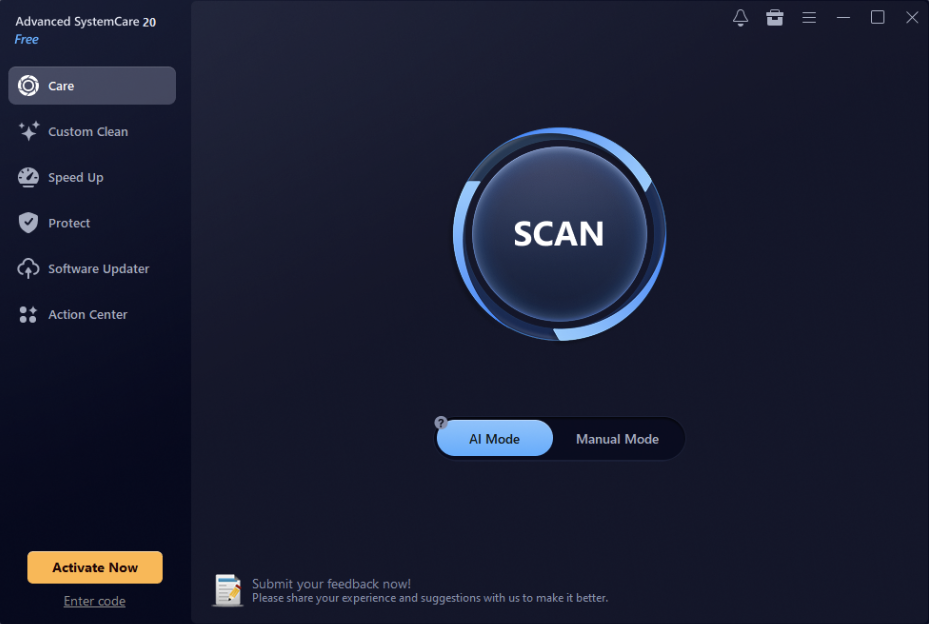
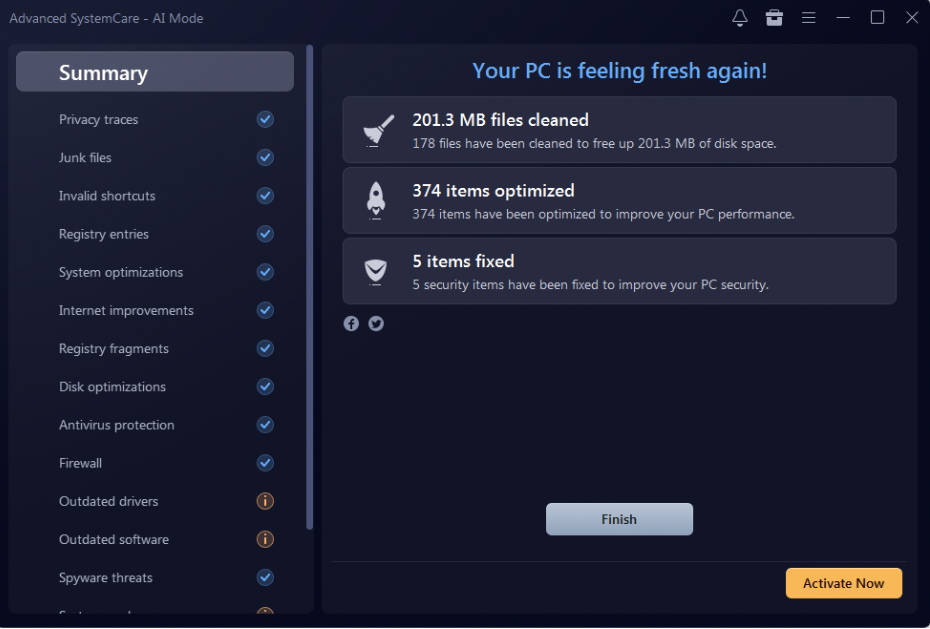
  • Now, you’ll see two modes: “AI Mode” and “Manual Mode.” If you want to remove junk files without any manual effort, then go for “AI Mode.” Select the desired mode and click on the “Scan” button. 
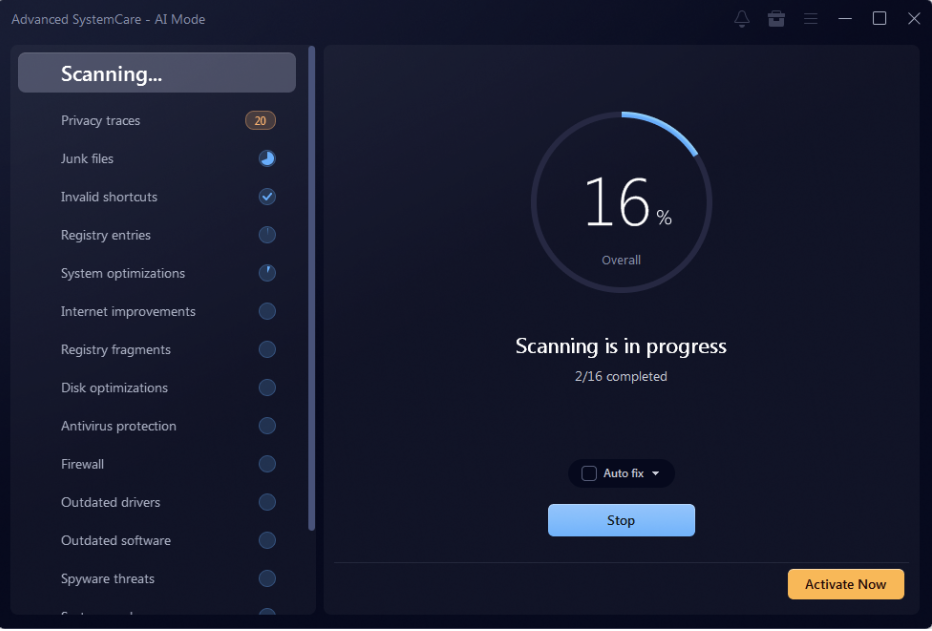
  • Advanced SystemCare will completely scan your device and find junk files, temporary data, cached files, leftover application data, and more. Once the scan is complete, users can review the detected files, select the item they want to remove, and click the “Fix” button. 
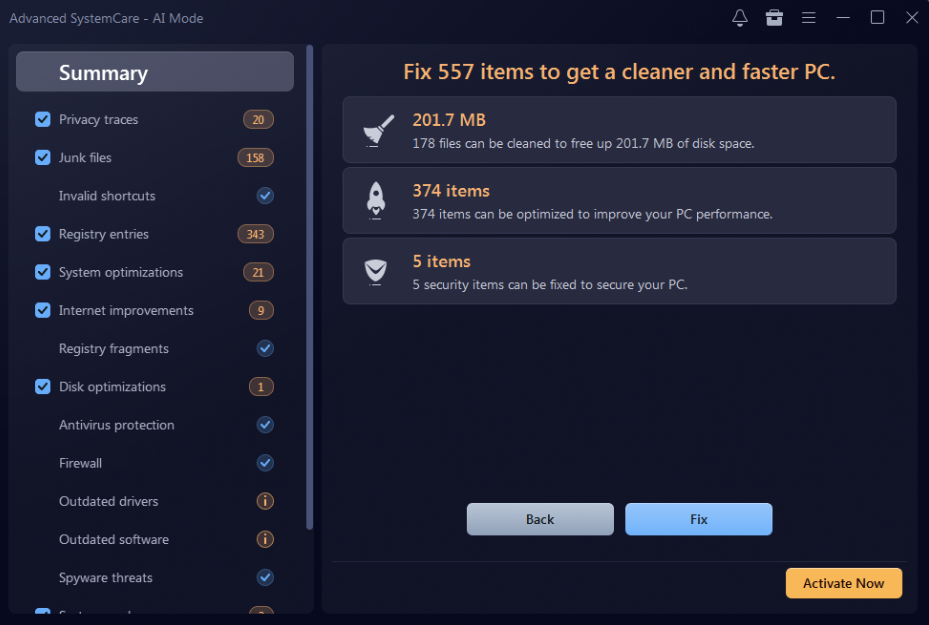
  • The program will automatically remove the unwanted files from your system and help you reclaim gigabytes of storage space without any manual effort. Users can regularly run the cleaning process to prevent junk files from consuming valuable disk space. 
Final Thoughts 

Freeing up gigabytes of disk space shouldn’t require hours of manual file hunting. IObit Advanced SystemCare brings essential cleanup and optimization utilities together under one roof, letting you spot redundant data and clear out digital clutter effortlessly. Thanks to built-in features like Deep Clean and Large File Cleanup, you can quickly recover valuable storage without digging through endless system folders.

Share. Facebook Twitter Pinterest LinkedIn Tumblr Email
Stephen Fenech
  • Website

Stephen is the Tech Guide editor and one of Australia's most respected tech journalists. He is a regular on radio and TV talking about the latest tech news, products and trends.

Related Posts

Your Smart TV Knows More About Your Viewing Habits Than You Do: Here’s Why

November 16, 2026

Has Your Business Outgrown Xero or MYOB?

November 16, 2026

The Essential Eight Explained for Small and Medium Australian Businesses

November 16, 2026

Comments are closed.

100% Human
Tech Guide only publishes quality 100% Human content you can trust. AI has never and will never be used to generate any articles and reviews despite the rise of AI and the flood of AI-generated writing elsewhere. We also reject the use of our content to be used by AI in any form whatsoever.

Get the latest news from the Tech Guide straight to your inbox.

  • Home
  • Latest News
    • Appliances
    • Audio
    • Cars
    • Computers
    • Digital Cameras
    • Drones
    • Gadgets
    • Gaming
    • In-Car
    • Internet
    • Mobiles
    • Renewable Energy
    • Smart Home
    • Televisions
  • Reviews
    • Appliances
    • Apps
    • Audio
    • Computers
    • Digital Cameras
    • Drones
    • Gadgets
    • Gaming
    • In-Car
    • Mobiles
    • Smart Home
    • Smartwatch
    • Televisions
  • Blog
  • Apple
  • Samsung
  • Home
  • Latest News
    • Appliances
    • Audio
    • Cars
    • Computers
    • Digital Cameras
    • Drones
    • Gadgets
    • Gaming
    • In-Car
    • Internet
    • Mobiles
    • Renewable Energy
    • Smart Home
    • Televisions
  • Reviews
    • Appliances
    • Apps
    • Audio
    • Computers
    • Digital Cameras
    • Drones
    • Gadgets
    • Gaming
    • In-Car
    • Mobiles
    • Smart Home
    • Smartwatch
    • Televisions
  • Blog
  • Apple
  • Samsung

Apple TV 4K (4th Gen) review – adds intelligence and convenience to a high quality viewing experience

Apple HomeView review – stylish new way to stay connected, entertained, informed and in control

Tineco Floor One S9 Artist Steam Plus review – effortless and effective chemical-free cleaning

MacBook Pro with M6 review – brilliant combination of speed, performance and battery efficiency

Hisense XR10 review – a 4K triple laser projector for all seasons and all viewers

iPhone Duo review – an irresistible combination of hardware and software

Make the right move and take a listen to Episode 720 of the top-rating Tech Guide podcast

Get in the fast lane with the latest episode of Two Blokes Talking Electric Cars – the EV podcast

The Best Movies You’ve Never Seen – The Sting

© 2025 Techguide. Designed by Multimediax.

Type above and press Enter to search. Press Esc to cancel.